May 19, 2013

UM Website Redesign Coming Soon

screenshots of two web pages

Final designs for UM home and secondary pages

You may have heard rumors that we are in the process of redesigning the UM website. You may have even taken part of one of the focus groups that provided input on what a design should include. Perhaps you were one of the people who provided feedback about the design concepts in our survey last September. Or, maybe this is all news to you and you’re thinking “What website redesign?” Whatever your involvement, we appreciate your help (…except for maybe that last group). We are well on our way to implementing the new design.

Two Phases

The structure of the website partially reflects the overall structure of the university. The UM homepage promotes the university itself, while “departmental” sites represent the colleges, schools, and organizations that make up the university. The website will be upgraded in two phases. The first will address the UM home and secondary pages and should be completed on April 13. The second phase will begin in early May as departmental sites are assisted in their adoption of the new template.

Trusted Friends

Although the university’s Web Planning Committee came up with the main structural components of the site, and University Communications created the initial concept designs, we turned to a professional design company, Mercury Intermedia, for the final design. This same company created the Official Ole Miss App and we chose them because we wanted the style of the new website to reflect that of the app. Working with people outside the university has not only helped us refine our broad concepts into more functional content organization and better use of screen real estate, but it has also provided opportunities where we could strengthen the website’s overall usefulness. Here are just a few of the paradigms we’re exploring this time:

  • The primary focus should be on potential students and others interested in learning about us. In the past, we’ve promoted all our audiences equally. But more thoughtful design suggests it is best to cater to the people who are most likely to go elsewhere if they can’t find what they need quickly. By dedicating primary navigation and promotional areas of the page to those visitors, we can hopefully grow our base.
  • Assume everyone else is more committed to finding what they need. Our current students, faculty, and staff already have a sense of what they are looking for, and they are willing to take a few extra seconds to learn where it is. This frees us from having to crowd the top of the page with shortcuts and links that most anonymous visitors can’t even use (e.g., myOleMiss, Blackboard, etc.). We trust our core users will be able to find their most commonly used links lower on the page. And if they want to have even easier access to those links, they can set bookmarks in their browser.
  • The design needs to be almost invisible. This Zen-like approach allows the content to stand out by avoiding the use of distracting graphics in the layout. Of course the graphics, fonts, text sizes, and spacing are all there, but they should feel natural, almost too obvious to even notice. Comfortable spacing and proper alignment help the reader’s eye to move more easily from one area to the next.

Design ≠ Website

Mercury designers have provided us with Adobe Illustrator files showing how the pages should look on different sized screens. It is the job of the Webmaster (with the generous help of others in IT) to go from those designs to functional Web pages. Much of the home page will consist of content generated by feeds from Ole Miss News, the Event Calendar, Twitter, and UM Today. University Communications is revising and, in many cases, creating new content for the dozens of secondary pages.

same website on different devices

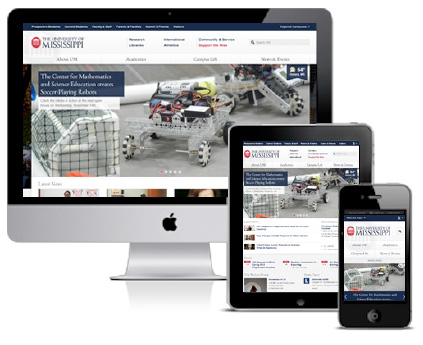
Responsive design means a single website adjusts to the size of the device on which it is being viewed.

One major change coming is that we will no longer support a separate mobile version of the website. The new layout will, instead, use responsive design and progressive enhancement techniques to present a fitting layout for whatever browser visitors use, whether it be a mobile device or a high-definition monitor. Through the use of HTML5, CSS3, and Javascript, we are in a position to have much better control over the visitor experience.

Obstacles to the “Bleeding Edge”

In 2009 during our previous site redesign project, we had to consider the browser limitations of the majority of our audience. At the time, over 65% of our visitors used Internet Explorer, and IE8 was released only in March of that year. IE6 and IE7 were recognized even at the time as failing Web-standards testing. (IE8 is somewhat better.) This situation made it difficult to provide a common look and consistent functionality across our entire audience base. So it is a great relief to see that only 12% of our current visitors uses IE8 or lower. Even though Google dropped support for IE8 in November, we still need to provide at least partial support for it. This means there are still some new techniques that we still aren’t able to fully implement because IE8 and some other browsers don’t yet support them. Still, whenever we are sure we won’t be facing one of those browsers, like on mobile devices that don’t have IE, we’ll try to “sneak in” a few neat tricks!

If you are an Internet Explorer user and you aren’t yet using IE9, it’s a good time to consider either upgrading or switching to browsers that respond better to the modern Web environment like Safari, Firefox, or Chrome.

Search UM

Another big change is how you find things. The new Search UM application has combined most of our Web index and directory listings into a single search field. And because it returns many different categories of results, adding the Search UM form to every page frees us from having to waste space by linking to several separate directory listings. Simply enter what you’re looking for and you can jump from one part of the site to another.

In with the New

We are looking forward to implementing the new home page design on April 13. A lot of time, thought, and creativity has been put into it, and we think you’re really going to like using it. If you have a couple of minutes, you might want to look back at past site designs we’ve had to get an idea of how technology and tastes have changed over the years. Soon, the current UM site will be retired to that archive as well.

Short Links for UM Google Sites

Sites are Google’s cloud solution for web site development. Provided as a part of Google Apps for Education at the University of Mississippi (UM), faculty, staff and students are beginning to use Sites for course collaboration sites and organization web pages.

One reported downside has been the length of the Sites links. I have good news. You can promote a shorter link for all your Sites hosted under the UM Google domain.  When you are ready to publicize your site, use the link http://sites.olemiss.edu/google_site_name where google_site_name is the name you chose when creating a Google Site under your UM Gmail account.

Your Google Sites

We want to know what you are doing with Google Sites to share with your colleagues in a future TechNews article.   Send me an email so we can share your creativity!

Further Information

Visit the IT Helpdesk web design link to learn about web design options at UM.   If you have a UM Gmail account and want detailed training on Google Sites development,  Google offers online training.

New Event Calendar

event calendar screen shot

Last week a new Event Calendar was rolled out for the university community. It may look similar to the old one on the outside, but underneath it is fundamentally different.

There are so many online calendars on the market that it is worth explaining why we chose to build a new one. There are two aspects to advertising an event on the Web. One is to have it listed in a calendar where everyone can find it. The other is to let people know there’s something on the calendar to see. We had applications for both of those, but there was nothing linking them. A person would have to submit all the necessary information for an event to be put on the calendar, and then submit it all again through a different process in order to tell people about it. The errors and delays caused by this necessary redundancy compounded the difficulty. And, frankly, our campus calendar lacked many events that people would expect to find on it, due mainly to these difficulties.

To avoid additional time entering duplicate information, we chose to combine the two processes. An event would be its own announcement. The new calendar is run by UM Today, our one-stop announcement delivery system. When an UM Today administrator enters an event announcement, she is presented with new fields for date, time, location, and sponsors so that all the pertinent information is gathered at one time. Once submitted, the event immediately appears on the Event Calendar, and the announcement for it will appear in UM Today for the specified period prior to the event date. So today you can submit an announcement for an event in the fall, and by setting the “validity dates” correctly, it will start being announced in UM Today up to 21 days prior to the event. And since announcements can be pushed to the Bulletin Board, it will also appear on the UM home page at the same time.

Additional features are already planned, including a method of displaying sponsored events directly in the sponsors’ websites. Expect to see further improvements over the next several weeks. Please let us know if you have ideas to make it better. And, by all means, be sure to add events to the Event Calendar–It’s where people are looking.


IT’s Errol Sayre Featured in the SAP Community Network

Errol Sayre

As noted in an earlier TECHNews article, the University of Mississippi’s (UM) Office of Information Technology (IT ) is a ramp-up site of a new technology from SAPSAP NetWeaver Gateway (NG).  As part of this ramp-up, Errol Sayre, Systems Analyst III, was part of the project team that delivered an iPad  application for UM Admissions Counselors.  These counselors travel to high schools and other educational institutions throughout the United States to meet prospective students who are interested in attending the University of Mississippi.

The counselors wanted to be able to query admissions and prospective student data while on-site without the bulk of a laptop.  The IT project team developed a native application using Objective C that interfaces with NetWeaver Gateway to retrieve data from our SAP ERP system.  This allows the counselors to quickly search for prospective student information by their student attributes and school.   In addition, corresponding screens from the myOleMiss portal were incorporated into the app using a general purpose Web browser that Sayre built into the application.

Sayre’s article is entitled Consuming NetWeaver Gateway Services in iOS.  The SAP Community Network (SCN) is SAP’s professional social network, and is used by SAP customers, partners, employees and experts.

IT’s Chris Reichley Featured in the SAP Community Network

The University of Mississippi (UM) Office of Information Technology (IT) is an early adopter of a new technology from SAP, NetWeaver Gateway.  As part of this project, Christopher Reichley, Systems Analyst and Associate Director of IAEGS, attempted to consume a Gateway service using PHP from an Apache Web server and encountered performance issues with the OData library.   He found that the OData library was not optimized for use with common security practices on a Web server, and he was able to enhance this library to allow it to function better with these security practices.  “Without the fixes and changes,”  says Reichley, “the service was taking 14+ seconds to return a search.  With the changes, it is only a second or two.”

The changes were communicated to SAP in one of the weekly conference calls that the project team holds, and Chris was asked to write a blog article for the  SAP Community Network (SCN).  His article is entitled Consuming SAP NetWeaver Gateway OData Web Services Using PHP.

The SAP Community Network is SAP’s professional social network, and is used by SAP customers, partners, employees and experts.

UM Mobile Site Reworked

New UM Mobile Website Layout

New UM Mobile Website Layout

The UM Mobile site recently got a completely reworked layout.  Looking more like an app than a mobile website, the new layout features icons at the main and some secondary levels to make navigation easier. Behind the scenes, the visitor’s screen resolution is used to guess which version of the site (mobile or full) that he or she will want to see. Screens smaller than an iPad’s 768 pixels are automatically shown the mobile site while larger screens get the full site.  Visitors have the option of choosing to see the other version, as well. Once they do so, the server writes a cookie to their device so they can remain in that version across the site.

Expect to see more sites added to UM Mobile as more of our sites become mobile-ready.

Never Miss the Bus

Oxford University Transit buses are now GPS enabled for real-time tracking, and riders can get bus schedule information  using their computers or smart phones.  Riders can now stay on schedule, plan their travel, and never miss a bus again.

NEXTBus screenshot

NEXTBus map show realtime location of O.U.T. buses

Screen shot of map links

Screenshot of Live Bus Schedule Links

The O.U.T. buses’ real-time transit information is made available by NEXTbus, a transit management solution provider which uses satellite technology and advanced computer modeling to track vehicles on their routes. NEXTBus can estimate vehicle arrivals with a high degree of accuracy. On their site, you can even see mapped bus positions updated constantly.

While we have had overlays of the bus routes available on the campus map for a while, we have now added links to this live information also.

Mobile Campus Map

Mobile Campus Map

NEXTBus screenshot

NEXTBus Mobile

Our mobile campus map has links to the mobile version of the NEXTBus app.  This version determines the closest bus stops to your location, and then it displays the arrival times for those buses. For the mobile site, direct your smart phone to m.olemiss.edu and choose Campus Map. The Live O.U.T. link is at the bottom.


Firefox 4 – Not Recommended

You may have recently read about or been prompted to upgrade your Web browser to Firefox version 4.  This new version of Firefox, released on March 22, 2011, has been causing its own share of headaches on the UM campus in recent days.

Firefox 4, on both the Windows and Mac platforms, is not compatible with myOleMiss, due to issues with the SAP portal environment.  Blackboard also does not support this version of the browser.  For these reasons, the IT Helpdesk recommends that you do not update your browser to version 4 at this time.

If you have already updated to Firefox version 4 and are currently experiencing issues, you will need to roll back to an earlier version. You can download the previous version of Firefox 3.6.16 at http://www.mozilla.com/en-US/firefox/all-older.html.

New UM Web Directory

The Web Directory is a powerful new tool on the UM Web site for locating information about campus offices, organizations, committees, and even buildings. Replacing the old “Web Registry,” the new Web Directory provides much more than just a list of departmental Web sites.  And now you can even search using a department’s alias.

Web Directory

Screenshot of the Web Directory

A Guided Tour

Even though it is located within the myOleMiss portal, the most common way people will find the Web Directory is through the A-Z Index located on the UM home and secondary pages. The system is built on the concept of searchable, interlinked information pages, or “infopages.”   Let’s say you’re on the UM home page and you want to find the fax number of the English department.  You would first pull up the A-Z Index and select “E” for English.  You’ll be presented with a list of directory entries whose names or aliases start with the letter “e.”  This page also shows the main interface for the Web Directory which includes a search field and checkboxes indicating the types of entries returned.  Each type of entry is identified by its icon.

Although you can probably locate “English” in the list without too much work, let’s limit the types of entries returned by unselecting Buildings, Committees, and Other Entities.  (The English department is an “organization” within the University, so we’ll leave that one checked.)  Now click the letter “E” again and you will see only organizations which begin with “e.”  Note that if you had clicked the “Go” button with “E” in the search field, it would retrieve a long list of the entries which contain an “e” anywhere in their titles. Only the alphabetic links limit the search to just first letters.

Now that you have found the “English” link, click it to reveal an infopage for that department. The fax number you needed is there, along with the mailing address, the link to the department’s Web site, and even its position within the greater University structure (e.g., in the College of Liberal Arts).

You’ll notice the Web Directory is tied-in with the Campus Map.  So if you changed your mind and decided to deliver your letter in person instead of faxing it, you could follow the building link to the infopage for Bondurant Hall where you can see it on a map. On that page you might notice that Modern Languages also uses Bondurant, and you could follow that link to explore further. To return to the directory home page, select the “Web Directory Search” link at the top right corner of the page.

User-Contributed Content

In that corner of the screen you will also see the “Request a Change/Correction” link which is where the process of updating the directory’s content begins. If you should find any information that is old, wrong, or omitted, you may use that form to submit the correction. This system, like the one before it, relies on responsible parties to take ownership of their directory entries and keep the information current.

What’s Another Name for “Alias?”

The use of aliases opens a whole new level of functionality not previously available.  In the past, separate entries were needed for “College of Liberal Arts” and “Liberal Arts.”  With the ability to list multiple aliases for an entry, a single entry can show up under both the “C” and the “L.”  Aliases can be added using the same “Request a Change/Correction” form.

Also included in the directory are standing committees along with membership lists when available. Other entities, such as groups, clubs, and student organizations (not to be confused with organizations within the University), are also represented.  If you are a responsible member of one of these and would like to list more information about your group or add a link to its Web site, use the “Request a Change/Correction” link and provide the information you want listed.

Please feel free to explore and contribute to the new Web Directory.  You might discover something you didn’t know.