May 23, 2013

Provide Guests With Internet Access Using Wireless Guest Services

Today, University of Mississippi (UM) students, staff and faculty can gain internet access by using the UM wireless network.  Using a UM WebID and corresponding password, UM wireless service is available at various locations on our Oxford and regional campuses.  Further, parents visiting one of our campuses may also gain UM wireless access, provided they have a parent WebID.

But what about our guests on campus? Fortunately our Network Management group within the Office of Information Technology (IT) have provided a self-service solution named UM Wireless Guest Services.   This service request is driven by an individual with an active UM WebID.   The individual simply signs in, completes the required information and the guest account is created immediately.   Do you need to provide access to multiple guests for a special event?  No problem.   While active, a guest WebID can be used by multiple people for UM wireless access.

If you have questions, please contact the IT Helpdesk at 662-915-5222 or helpdesk@olemiss.edu.  They are available from 8 AM – 5 PM, Monday through Friday.

Wireless Gaming Support

A new application is available in myOleMiss that will permit the registration of one approved wireless device with limited browser capability per user.  The current list of approved devices includes Nintendo WiiTM, Microsoft XBoxTM,  Sony PS3 TM , Barnes & Noble NookTM, and Amazon KindleTM.

Before registering your device, you will need to know its MAC (Media Access Control) address.  A MAC address is a unique identifier that enables a device, such as gaming consoles, to communicate with the network.  For information on  locating  the MAC address  for your device, visit the  MAC Authentication page which is part of UM’s Wireless Service Support.   Once you have identified your MAC address, log in to myOleMiss to register your device:

Students:  Choose the My Profile tab => Wireless Device Information located in the left “Detailed Navigation” menu .

Employees:  Choose the Self-Service tab => Wireless Device Information located in the left “Detailed Navigation” menu.

Wireless technology is a shared technology, and performance can vary based on the number of active users in an area at any given time.  Wired connections are not subject to that limitation, and there are no restrictions on the number of gaming devices a user can connect to the wired network.  Keep in mind, there is a finite amount of campus Internet bandwidth available for all activities.  Also, all wireless activity is your responsibility and is bound by the Appropriate Use Policy.

For assistance, contact the IT Helpdesk at (662) 915-5222 or helpdesk@olemiss.edu.


New Wireless Login Method

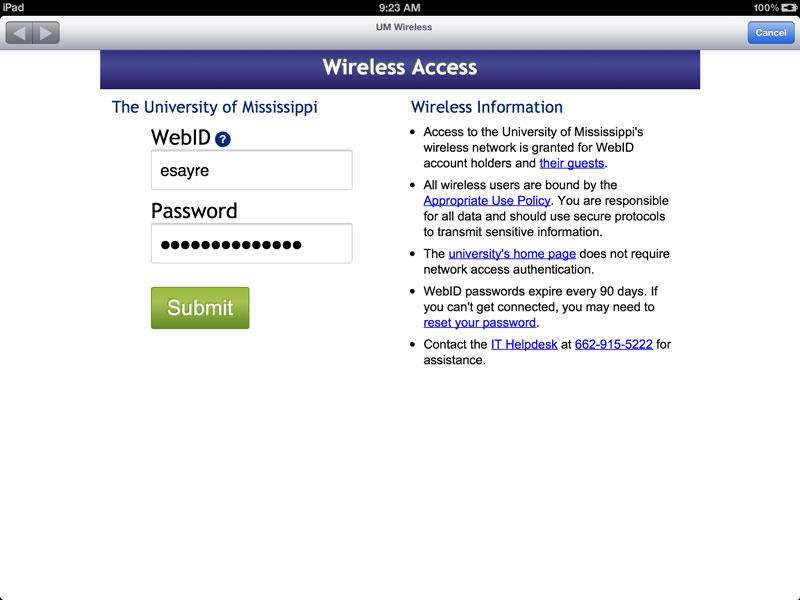
Beginning Tuesday, August 2nd, users of the UM wireless network will have a new, more streamlined method for logging into the wireless network.

Screenshot of the new wireless access form

Screenshot of the New Wireless Access Form

The Network Management Team of the Office of Information Technology (IT) has been working throughout the summer to deploy a new WebID-based method of authentication that will eliminate the need for users to install client software onto their devices.  This new method will improve support for newer devices and simplify the process for accessing wireless services.  The only requirement for this method is the availability of a browser on the device.

Campus guests requiring access to the wireless network will continue to follow the established process at the UM Wireless Web site.

If you have been using the existing Network Admission Control (NAC) system and wish to remove the Cisco Clean Access Agent client software, instructions are available for you to do so.   It is not necessary for you to remove the client software for the new system to work properly, but it is no longer needed.

Wireless Gaming Support

A new environment that will allow students to register one wireless gaming device per user is also being developed.  It should be noted that wireless technology is a shared technology and performance can vary based on the number of active users in an area at any given time.  Wired connections are not subject to that limitation and there are no restrictions on the number of gaming devices one user can connect to the wired network.  Keep in mind there is a finite amount of campus Internet bandwidth available for all activities.  More information will be available soon regarding registering wireless gaming devices.

UM Wireless Network Update

Photo of an installed wireless access point

The University of Mississippi (UM) wireless network began in 2007 and, over time, has expanded to include more than 70 buildings.  The wireless network is managed by the Office of Information Technology (IT) and currently consists of 822 wireless access points, a number that grows daily.  The most recent additions came this past fall when wireless access was made available in Bondurant Hall, Bishop Hall, and Hume Hall.  There are 56 wireless access points in Campus Walk, the highest number for any UM residential area. To find out about current wireless availability, visit Wireless Service Support.

Keeping up with Ever Increasing Bandwidth Needs

Provisioning and administering bandwidth is an ongoing challenge for most major universities.  IT works diligently to provide a network that is open, flexible, and secure and promotes an optimal learning environment.  This involves giving priority to network traffic that is closely tied to UM’s academic mission such as access to Blackboard and myOleMiss, research projects, and administrative activities.  This past fall, IT acquired more commodity Internet bandwidth to accommodate increased network usage and also adjusted network management policies to give more bandwidth to residence halls after 6 p.m. when many UM offices are closed.  IT also added fair share policies that prevent a single person from taking all of the available bandwidth.  IT evaluates bandwidth requirements regularly to determine if more resources are needed to accommodate growing demand.  Plans are already underway to acquire more overall bandwidth for August 2011.

Figure 1 shows  Oxford campus bandwidth usage during the last year.  Blue represents outgoing traffic, and green represents incoming.  Note the increases and decreases that follow the academic calendar.  That is, when students are not on campus, bandwidth usage plunges.  Also, note the overall increase over time.

Figure 1. UM Bandwidth Consumption

A related issue, which is also an ongoing challenge for most major universities, is curbing illegal downloads and copyright infringement on the campus network, especially in residence halls.   IT receives several reports each week from groups such as the Recording Industry Association of America (RIAA) of network users illegally downloading movies or music.  In these cases, the offender is blocked from the campus network, and disciplinary actions are initiated.  See http://umnoc.olemiss.edu/blocked for a list of currently blocked addresses.  With the increase in legitimate media streaming services, it is becoming more and more difficult to discern in an automated way which activities are illegal and which are not.  This sometimes leads to network policies that inadvertently throttle legitimate traffic.  Good communication between IT and users of the network is crucial in order to prevent legitimate streaming services from being throttled or blocked.

Network Access Control (NAC) = Safe Network

In September 2009, IT implemented Cisco Systems’ Network Access Control (NAC) Agent as a security measure, allowing the network to identify the user and grant access.   NAC systems are used broadly in university and corporate settings as a means for maintaining a clean network.  Users of the UM wireless network are required to install a small application called the NAC Agent on their computers when they first connect.  Once installed, the software (Cisco Clean Access Agent) will enable these computers to automatically logon and remain online throughout the day.  The NAC Agent also allows for the connecting system to be checked, for example to ensure anti-virus software and operating system patches are up to date.

IT Helpdesk call logs suggest that most issues reported with the wireless network are actually problems installing the NAC client on a particular laptop.  For example, the NAC Agent will not install correctly if the computer is infected with a virus or has a firewall that is not configured correctly.  For a full list of potential NAC issues, see http://wireless.olemiss.edu/nac.html.

Although the use of NAC technology is critical for network security, it can cause problems for gaming devices.  Browser-less consoles (e.g., Wii) which have wireless-only capability are not supported, because they can’t authenticate the WebID and password. These devices boot up and try to connect to the wireless network, but will not be successful.  Gaming consoles with an Ethernet port (e.g., Xbox 360 and PlayStation 3) can connect via Ethernet cable to the wired network without WebID authentication.  IT is currently working with vendors to incorporate support for browser-less devices and plans to “go live” with this functionality in August 2011.

Contact Us

Since January 2011, fewer than fifty trouble tickets have been logged regarding the wireless network, yet in this same time frame over 90,000 devices were logged in.  If you are experiencing any technical difficulties, please contact the IT Helpdesk at 662- 915-5222 or  helpdesk@olemiss.edu so that issues can be addressed and resolved.  This includes reports of a slow network.  In these cases, it is very important to note the time and location of the access as well as the kind of service that was being used such as Facebook or Blackboard.  We appreciate your help as we continue to work to provide a high quality network experience for everyone.