May 23, 2013

Computer Lab Enhanced in Weir Hall

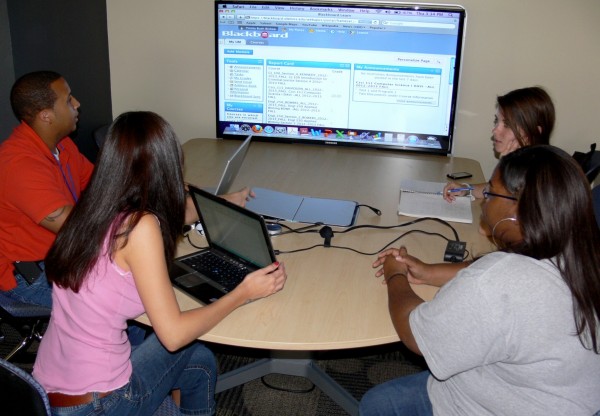
Weir Hall Media-Scape Table

Media:scape Table

The Galtney Center for Academic Computing in Weir Hall opened in November 2002.  The Center was made possible by a $4 million gift from Ole Miss Alumni Will and Susanne Galtney of Houston, TX.  Commonly referred to as the Weir Hall computer lab, students and employees have access to 50 computers around the clock.   During the Fall and Spring semesters, we have approximately 500 visitors daily (Monday – Friday).

In summer 2012,  the Office of Information Technology (IT) made plans for enhancements.    With the assistance of Facilities Planning, these enhancements are complete and available for students and employees today.  Below are the highlights.

Collaboration Deck

The plateau area to the left of the central lab desk has been significantly remodeled to enhance collaboration, especially for those with smartphones, tablets and laptops.   Included is a small coffee table area complete with Jenny Round chairs, an eight foot wide glass whiteboard and finally a Steelcase media:scape table for small group meetings.  The media:scape table allows participants to share their screen or desktop in HD quality on our 55 inch HDTV.  Please drop by Weir Hall or check out the photos on our IT labs site to preview these enhancements.

Wide Screen Monitors

Gone are the days of 19 inch monitors in the lab.  IT installed 30 wide screen monitors (22 inch) over the summer.

Bottled Water

We now welcome your bottled water in the computer lab area!   If you want to munch on Doritos or slurp Starbucks coffee, you can still use the tables in the Weir Hall hallways.  Just remember, the Ole Miss home run shower is allowed at the baseball stadium, not in the computer labs.

Future Plans

Now that we have completed the physical enhancements, next up are discussions to implement single sign-on.  That will mean students and instructors visiting Weir Hall labs could login to computers and release printer jobs using their WebID.   Stay tuned.

Wireless Printing for Students – New!

Students -   Do you need to print your documents from your personal computer or laptop to a centralized location on campus?  If yes, you now have the convenience of wireless printing.  The Office of Information Technology (IT) is making this new service available in response to specific requests from students.

Taylor McGraw, newly elected ASB President

The Idea

Taylor McGraw, newly elected Associated Student Body (ASB) President, along with ASB committee member, Christa Creasy, met with IT staff members earlier this year to discuss possibilities of making wireless printing available to students.   This discussion took place while Taylor was chairman of the Student Affairs Committee in the ASB Senate.  “Most students currently have to print from the desktop computers in the library or Weir Hall,   which means they have to (a) get to one of those locations (b) find an open computer and (c) transfer their document to the desktop before it can be printed,” explained Taylor.   “It is a hassle around exam time.  The ability to print wirelessly will allow students to print straight from their laptops anywhere on campus and pick up papers at their convenience.”

Printer Location & Costs

For now, there will be three participating printers all of which are located in the main student lab of the Galtney Center for Academic Computing (Weir 114).  As with all lab printing, there’s a cost of $.10 per page for black and white and $1 per page for color.  You must have funds in your   Ole Miss Express account to pick up your printouts.   To get your documents, you will swipe your Ole Miss ID card, which is the the same method currently being used to pay for print jobs within the IT Labs.

Ron Savell,  Manager of Technology Services (IT), has been instrumental in setting up the wireless printing service. “I feel that once everyone becomes familiar with the availability of this service, it could definitely be an advantage for the students,” noted Savell.   “My goal is to get it working well in Weir Hall first and work out any bugs before deploying it in other locations on campus.”

Making a Difference

McGraw believes that any student can make a difference, but you just have to ask for what you want.   “This will be a huge benefit to students,” stated McGraw.  ”This is an example of a group of students who noticed a problem and talked to the right administrators about a solution.  As ASB President, that’s what I seek to do in areas around campus, but I want to make sure students know that they don’t need to be in the ASB to make a difference. If a regular student had gone to IT with the same suggestion, I think we would have seen the same result.  I am really looking forward to seeing the system get going on a broad scale. ”

Getting Started

To get started with wireless printing, visit the IT Labs home page and find the Remote Printing block located near the center of the page. => Select ”Download” to install the software and printers onto your computer. => Follow the directions listed on the page.

Keeping it Going/ Welcoming Input

If the Weir Hall pilot goes well, IT will explore expanding the wireless printing service to additional locations around campus.  For assistance, please contact the IT Labs at (662) 915-7004 or itlabs@olemiss.edu, 114 Weir Hall.